
A diagnostic overview — quick checks, faster fixes
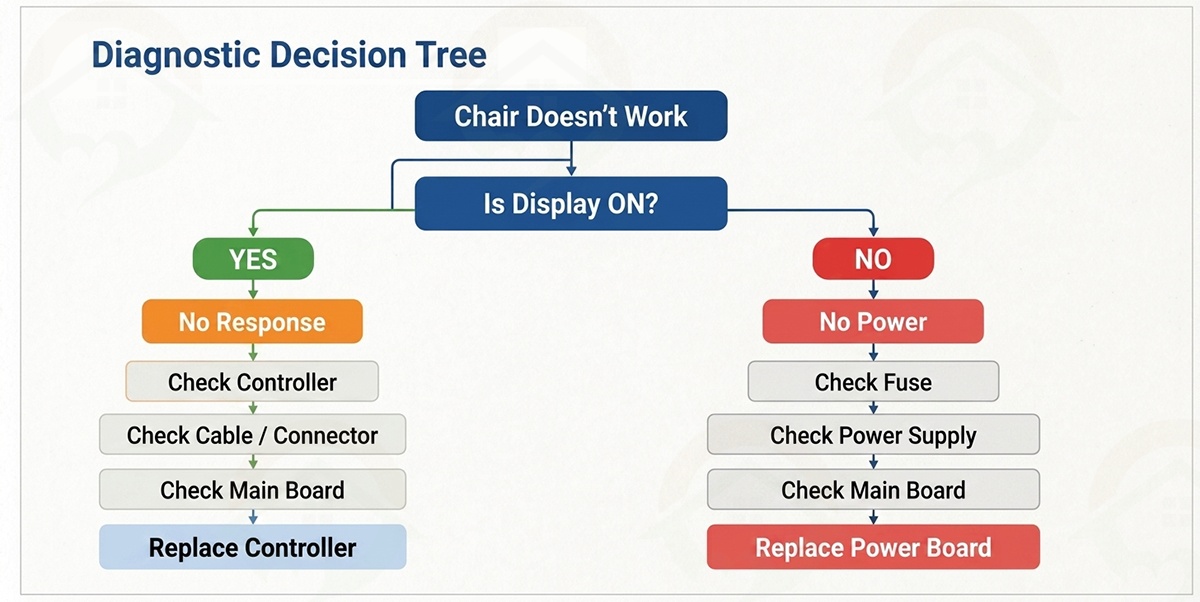
Every control board failure starts with the same one-minute question: is the display on?
A support ticket comes in: "Chair is dead, no massage, nothing." In the service tickets we log, nine times out of ten the first question a technician asks isn't about the motors or the board at all — it's simply whether the display lights up.
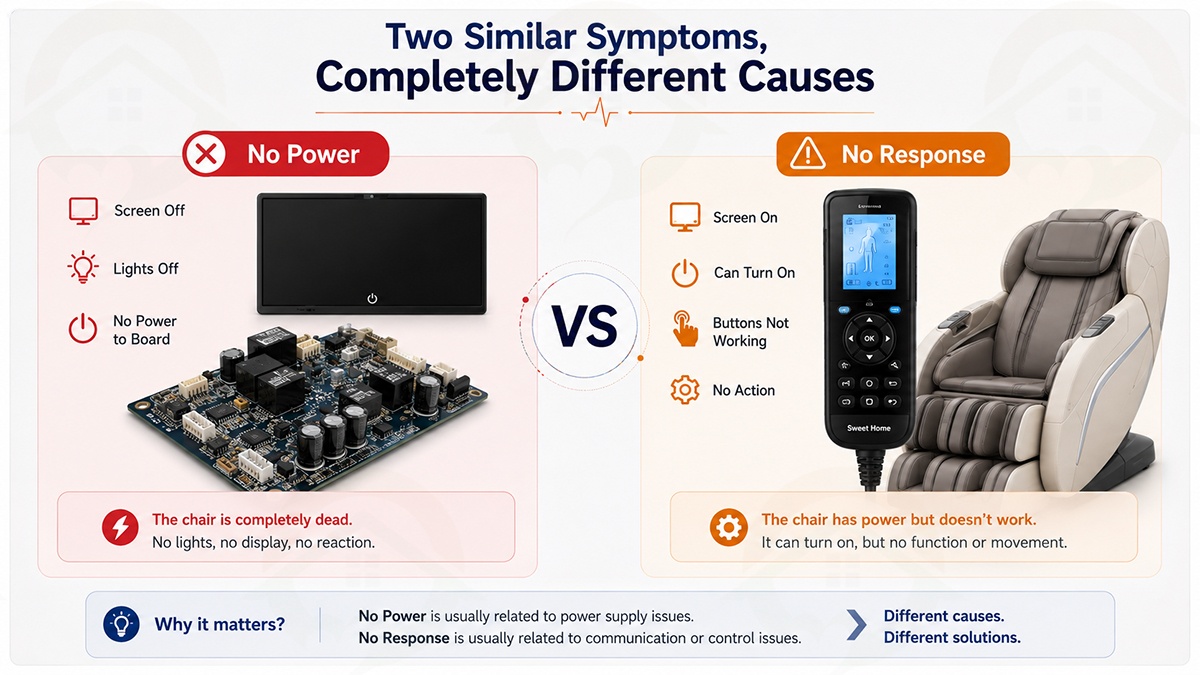
That one detail splits every control-board complaint into two completely different repair paths:
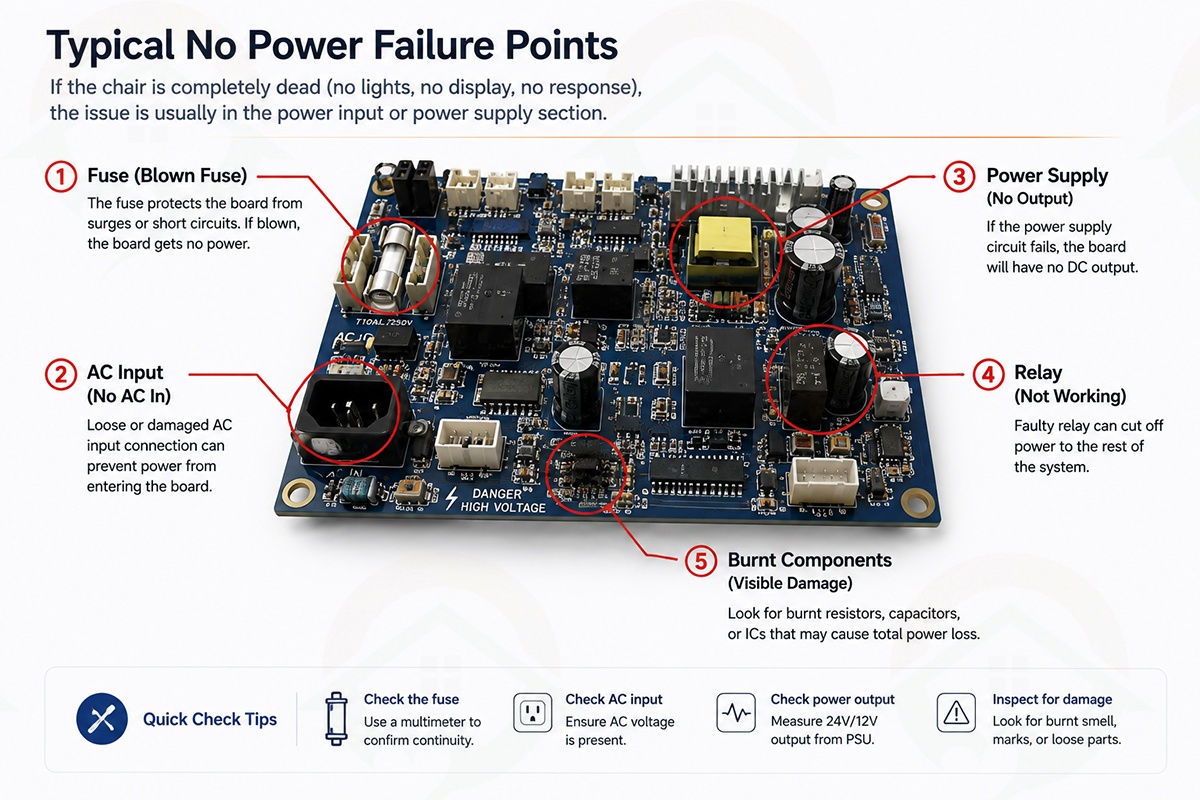
- Display OFF, no beep, no relay click → this is a power problem. Electricity isn't reaching the board at all.
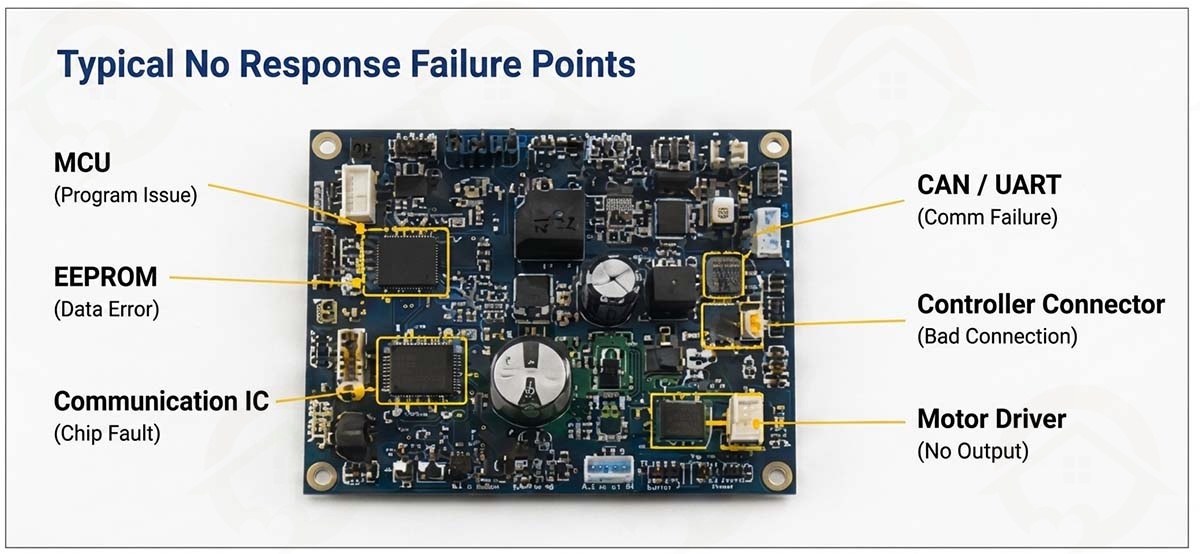
- Display ON, LEDs on, but buttons and motors don't respond → the board is powered but not executing commands. This is a control-board problem.
Confusing the two wastes time — buyers and after-sales teams sometimes ship a replacement main board to fix what was actually a blown fuse, or replace a power supply when the board itself had locked up. This episode is the map.
The four episodes that follow it (7.1–7.4) are the detailed explanations of why each failure mode happens.
Control Board Power Flow
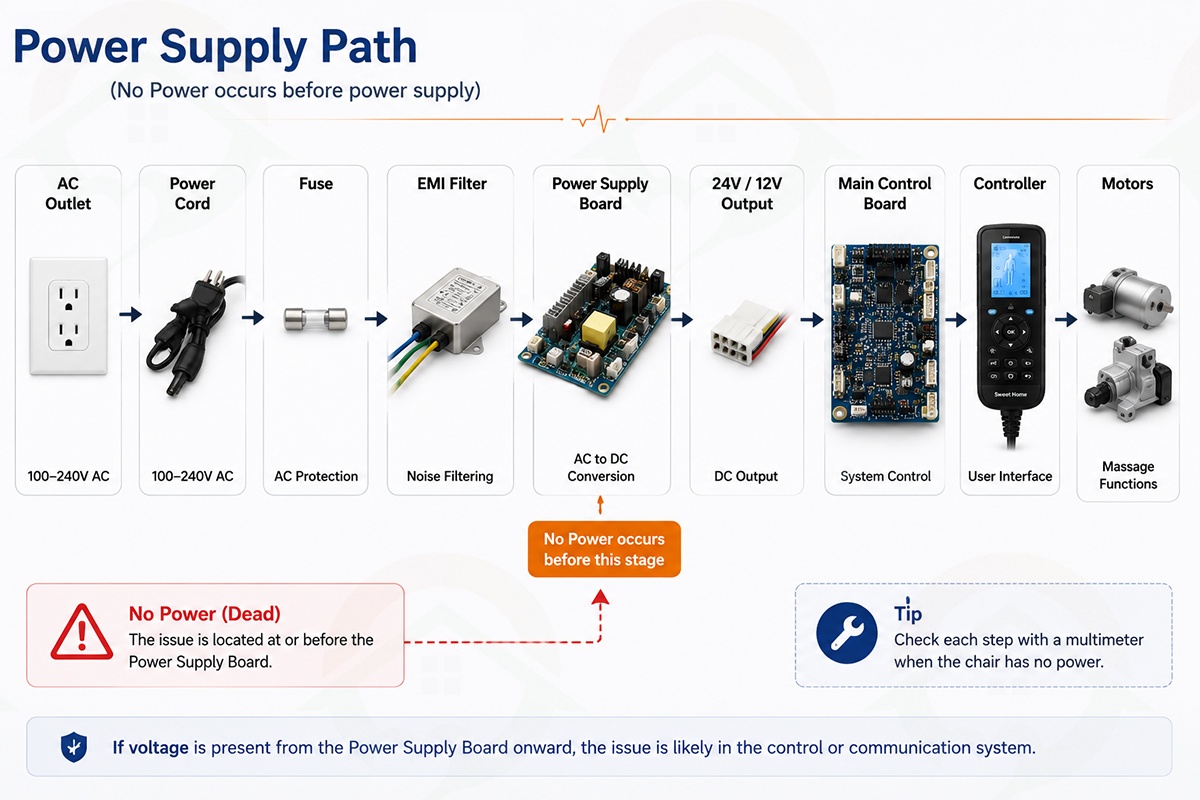
Before diagnosing anything, it helps to see the full chain electricity travels through on its way from the wall to a moving roller:
Every link in that chain can fail independently, and each failure looks slightly different from the outside:
| Stage | If this fails, the chair shows... |
|---|---|
| AC Input / outlet | Completely dead — no light, no sound anywhere |
| Fuse | Same as above — silent, total power loss |
| Power Supply | Dead, or intermittent shutdowns under load |
| Main PCB | Display and LEDs on, but no response to commands |
| Remote / Hand Controller | Display and board work, but buttons don't register |
Stable power in, stable control out, smooth massage experience — that's the whole chain in one sentence, and it's also the order technicians should check things in.
Where to Check First
When a chair stops responding, work through these six points in order before assuming the control board itself is at fault:
Power-Side Checks (Before the Board)
- AC Plug / Outlet — confirm power is actually available at the wall
- Power Switch — confirm the chair's own switch is on
- Fuse — visually inspect or test for continuity
Board-Side Checks (After Power Is Confirmed)
- Main Control Board — check the power LED and listen for relay clicks
- Remote / Hand Controller — check batteries and the cable connection
When one fails, the coil often still reads fine on a multimeter; it is the contact set inside that has worn through its rated life.
That is the kind of concrete component detail a board spec sheet should name — not just a brand name.
Reading the Symptom, Not Just the Complaint
The Four Symptom Patterns at a Glance
Most "the chair is broken" reports fall into one of four patterns. Each one points to a different subsystem — and each has its own deep-dive episode:
| Symptom | What It Usually Means | Covered In |
|---|---|---|
| No Display — LCD completely dark, no lights, no beep | Power isn't reaching the board at all | Root cause is upstream of the board (fuse/supply) — not a board-level topic |
| Frozen Display — display stays on but stops responding entirely | Firmware locked up, often after a minor fault (stalled motor, out-of-range sensor reading) it didn't handle gracefully | Episode 7.1 — The Brain and Its Firmware |
| LEDs On, But No Motion — everything lights up, motors don't move | Aging relay contacts, or a specific motion-drive line not delivering current to one mechanism | Episode 7.2 — Switching & Motion Drive |
| Intermittent / Silent Faults — works fine for months, then odd behavior appears (corrosion, drift, occasional dropouts under humidity or vibration) | Environmental protection, limit-sensing, or temperature-sensing wiring degrading over time | Episode 7.3 — Sensing, Limits & Protection |
| No Beep / Remote Sometimes Unresponsive — display is fine, but button presses don't register reliably | Connector wear from vibration and reclining stress, or signal-line interference from nearby motors | Episode 7.4 — Connectors & Signal Integrity |
No Power vs No Response in the Field
The fastest field distinction between no power and no response is exactly that table: a dark display with no lights and no beep means the board never woke up, so trace the fuse and power supply first.
A display that lights up but ignores commands is a no response fault, which points at the controller, cable, or main board firmware instead. Getting this one label right at the first visit decides whether you open the base of the chair or swap the hand controller first.
Built for Reliability, Designed for the World
One detail that matters specifically for export buyers: the power stage has to work across very different grids before any of the diagnostics above are even relevant.
— Texas Instruments publishes the reference material on how such regulators are characterized and protected.
A wide-range power supply (100–240V AC, 50/60Hz) is what lets one board design serve all three markets without a separate SKU for each grid — fewer part numbers to manage, and one less thing that can go wrong when a container gets shipped to the wrong region by mistake.
These are the same frameworks a factory should be able to show you documentation for, not just claim verbally.
Where This Series Goes Next
This overview is the map. Each numbered stop below is a full deep-dive:
- Episode 7.1 — The Brain and Its Firmware
- Episode 7.2 — Switching & Motion Drive
- Episode 7.3 — Sensing, Limits & Protection
- Episode 7.4 — Connectors & Signal Integrity
- Episode 7.5 — Ambience & OEM Customization Circuits
Previous in series: Episode 6.0 (Power Supply). Next: Episode 7.1 (The Brain and Its Firmware).
Electrical System Deep Dive Series
Prepared by Sweet Home Technical Team
Joe Fan
Manufacturing & Product Development Manager · Sweet Home
Sweet Home has manufactured massage chairs since 2013, drawing on in-house R&D and quality control for massage chairs and wellness equipment, with deep expertise in SL track mechanisms, 4D massage systems and zero-gravity ergonomic design.
Disclosure: Sweet Home is the manufacturer behind these chairs, and the service data throughout this series comes from our own repair logs and production line — shared so buyers can recognize these failure patterns before they reach a container.
Quick audit: is your control board spec complete?
1. Board failure modes explained in writing? 2. End-of-line board test confirmed? 3.
Two or more unchecked? Send us your current spec.